Why Fancy Text Shows Boxes, Question Marks or Nothing at All
Why do fancy fonts show boxes? The device showing the text has no font for that character, so it draws a placeholder; the text is not broken. Learn the symptoms, the riskiest styles, how app filtering differs, and how to test before posting.
By Maya Chen, lettering designer and type educator · Checked by Jordan Hale · · Published · How we review content
Key facts
- A box in fancy text, called tofu, means the device has no installed font with a glyph for that Unicode character; the text itself is not damaged.
- A diamond with a question mark (U+FFFD) or a plain question mark means characters were lost or decoded wrongly, which is a different problem from tofu.
- Google named its Noto font family after eliminating tofu: Noto stands for no more tofu.
- Bold, italic, cursive, gothic, outline and monospace styles are low risk, while Yi and runic styles are high risk on many devices.
- Usernames on Instagram, TikTok, Discord and X reject styled characters because of app filtering, whatever fonts anyone has installed.
Boxes, question marks and blank gaps look alike but come from different causes, and some can be fixed by the sender while others only by the viewer. Identify the symptom first, then the fix is usually short.
What does each box or symbol mean?
“It shows boxes” covers several different failures, and each has a different cause. Match your symptom first.
| What appears | What it means | Is the text damaged? |
|---|---|---|
| An empty rectangle ▯ | No installed font has a glyph for that character (tofu) | No, it will display on devices that have the font |
| A rectangle with tiny hex digits inside, such as 107A5 | Same as above; some systems, including many Linux desktops, show the code point to help you identify it | No |
| A rectangle with a symbol or block name inside | Apple’s “Last Resort” placeholder, which hints at which Unicode block the character belongs to | No |
| A diamond with a question mark � | The bytes were decoded with the wrong text encoding (U+FFFD REPLACEMENT CHARACTER) | Yes, the original character is gone from this copy |
| A plain question mark ? | A system that couldn’t store the character replaced it | Yes |
| Nothing at all, letters missing | The app stripped the characters, or a zero-width character is present | Depends; the app may have removed them |
| Some letters become colour emoji | 🅰 🅱 🅾 🅿 have emoji forms on many phones | No, it is a presentation choice by the device |
| Text spills over the lines above and below | Heavy combining marks (glitch text) drawn as intended | No, but some apps clip or remove them |
Only the first three rows are true “tofu”, and they are the most common with fancy text.
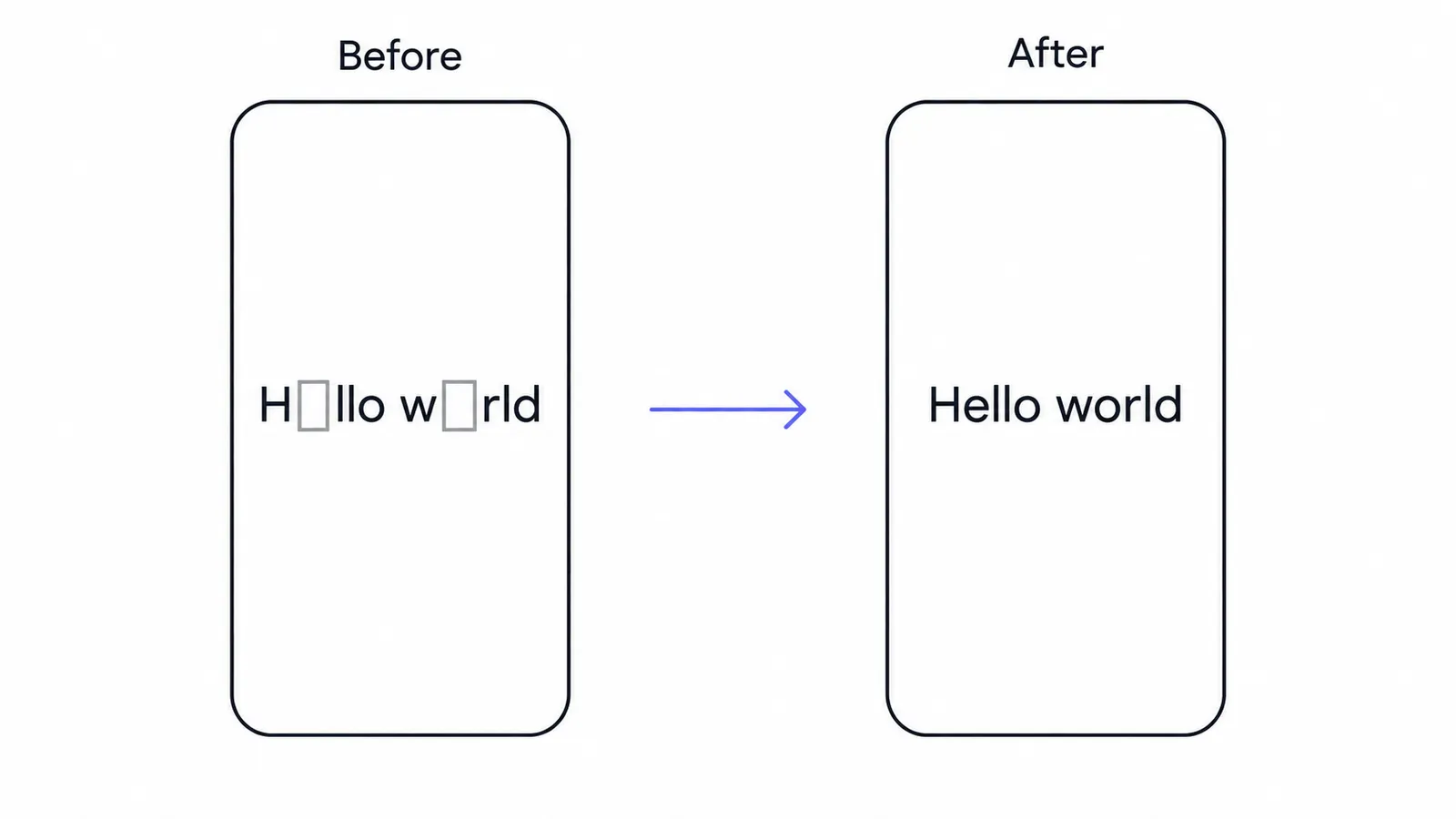
Why do fancy fonts show boxes on some devices?
Fancy fonts show boxes when the device has no font containing a glyph for that exact character. Every styled letter is its own Unicode character (the guide to how fancy text works explains why). To draw one, the device needs a font containing a glyph for that exact code point. Apps start with their preferred font, and when that font lacks the character, the operating system tries its fallback list: a sequence of other installed fonts, often ones designed specifically for symbols, maths or particular scripts.
Tofu appears when the whole list is exhausted. That happens for three reasons:
- The character is newer than the device’s fonts. Unicode adds characters every year. A phone that stopped receiving updates keeps the fonts it shipped with.
- The script is rarely needed in that market. Device makers decide which writing systems to include fonts for, and storage-constrained or regional builds may leave out minority scripts.
- The app ignores system fonts. Many games and some embedded apps bundle their own font and never consult the operating system’s fallback list at all.
Which fancy text styles are most likely to show boxes?
Risk depends on which Unicode block a style draws from. The generator rates every style under Compatibility & details; the table below summarises the pattern.
| Risk | Styles | Why |
|---|---|---|
| Low | Bold, italic, cursive, gothic, outline, monospace, sans | The Mathematical Alphanumeric Symbols block has been in Unicode since 2001 and is covered by maths fonts on all major systems |
| Low | Bubble (circled), wide (fullwidth), small caps, strikethrough, underline | Long-standing blocks with broad font support |
| Moderate | Squared and black squares, black bubble, letter tiles | Enclosed Alphanumeric Supplement; generally fine on current devices, but some letters switch to emoji and older systems may miss some |
| Moderate | Superscript, subscript, Cherokee, syllabics-based styles | Mixed sources; one missing glyph breaks the look of the whole word |
| High | Yi style (ꍏꌃꏳ) | Needs a font with Yi syllables, which many devices, especially older Android phones, don’t include |
| High | Runic (ᚱᚢᚾᛖ) | Runic fonts are not installed everywhere, and app fonts rarely include them |
| High | Any character added in the last few Unicode versions | For example U+107A5 MODIFIER LETTER SMALL Q, a true superscript q added in Unicode 14 (2021). Generators, including ours, use the older look-alike ᑫ instead for this reason |
The practical rule: the more obscure the source script, and the more recently it was encoded, the more people will see boxes.
If you want to see exactly which characters a style uses for each letter, the alphabet in different fonts pages list every letter with its code point.
Why do phones, computers and apps disagree?
The same string can look perfect on one screen and broken on the next.
- iPhone and iPad: Apple ships a large set of system fonts, and when nothing matches, it shows its Last Resort placeholder rather than a plain box. Older iOS versions lack characters added after their release.
- Android: Most phones use Google’s Noto fonts, but manufacturers customise the font set and update on their own schedules. A current flagship and a phone that stopped getting updates years ago can differ a lot. Discord users, for example, have reported maths-alphabet styles showing as boxes on older Android clients.
- Windows: Coverage depends on the Windows version and the app. Browsers generally use the system fallback chain well; some older desktop programs don’t.
- Games: Titles that bundle their own font may show boxes for characters that work everywhere else on the same phone. Players widely report this in BGMI and PUBG Mobile, which is why our BGMI name style and Free Fire name style pages favour characters that tend to survive in-game.
Is app filtering the same as a missing font?
Missing fonts and app filtering are easy to confuse, but they behave differently:
| Missing font (tofu) | App filtering | |
|---|---|---|
| What you see | Boxes on some devices, correct text on others | Characters vanish, or the app refuses to save |
| Who sees it | Depends on each viewer’s device | Everyone, because the characters were removed or rejected |
| Typical cause | Old operating system, rare script, game font | Username rules, spam and safety filters, character allowlists |
| Typical example | Yi letters on an older Android phone | Styled letters rejected in an Instagram or TikTok @username; glitch marks stripped in some apps |
| Fix | Choose a more widely supported style | Choose a field that allows styled text, or use fewer combining marks |
Usernames are the most common case of filtering. Instagram, TikTok, Discord and X all restrict handles to plain letters, numbers and a few symbols, so styled characters fail there no matter which fonts anyone has. Display names, bios and posts are generally more permissive.
How do I test fancy text before I post it?
You can’t check every device, but a few minutes of testing catches most problems.
- Look at the style’s rating. In the generator, open Compatibility & details on the result you picked. Styles marked limited support are the ones most likely to break.
- Send it to a second device. Message the text to yourself and open it on a different phone, ideally an older Android phone if you have one, and on a Windows computer.
- Paste it where it will live. Paste into the actual field, such as the bio, the display name or the game’s rename screen, and check the preview before saving. Some apps accept text in the editor and strip it on save, so reload the profile afterwards.
- Check one character at a time if a single letter fails. Mixed styles often break on just one letter, such as a superscript q or a squared letter that turns into an emoji.
- Ask someone else to look if your audience mostly uses a platform or device you don’t own.
How do I fix boxes in fancy text?
If you are the sender
- Switch families. Moving from Yi, Runic or other look-alike styles to bold, cursive, gothic or bubble letters fixes nearly every report of boxes. The bold text generator styles are among the safest.
- Replace the single failing letter. If one character breaks, swap it for a close alternative from a better-supported block, or leave that letter plain.
- Avoid new characters for important text. Anything added in the last few Unicode versions is a gamble on older phones.
- Use fewer combining marks. Light glitch text survives filtering far more often than heavy glitch text.
- Separate letter tiles. Regional indicator letters (🇦 🇧) combine into flags when two sit side by side, which can look like a rendering failure. Our generator inserts an invisible separator between them for this reason.
- Use an image when it must look identical everywhere, such as on a poster, thumbnail or printed piece.
If you are the viewer
- Update the operating system and the app. New system fonts are the most effective fix.
- Try another app or the browser. If text shows boxes in one app but not in another on the same device, the first app is using its own font.
- On a computer, install a broad font family. Google’s Noto fonts are free and cover most scripts; installing the Noto font for a specific script, such as Noto Sans Yi or Noto Sans Runic, usually fixes desktop browsers and documents.
- Copy the text elsewhere to read it. Because tofu is only a display problem, pasting the text into an app that can draw it reveals the original characters.
So why do fancy fonts show boxes? Because every styled letter is a separate character that needs a font on the viewer’s device, and the fix is a safer style, a field that allows it, or an image.
Frequently asked questions
Basics
Why can I see my fancy text but my friend sees boxes?
What does tofu mean in fonts?
Why does my fancy text show question marks?
Why do fancy fonts show boxes in a username?
Where it works
Why do fancy fonts show boxes on Android but not iPhone?
Why do fancy fonts show boxes in games when my keyboard shows them fine?
How it works
Will updating my phone fix the boxes?
How do I fix boxes in fancy text on a computer?
Tips & limits
Which fancy text styles are safest from boxes?
How do I test fancy text before I post it?
Related
- How Fancy Text Works (and Why It Isn't Really a Font)How do fancy fonts work? They are not fonts: copy-paste styles are separate Unicode characters, mostly made for mathematics, phonetics and East Asian typesetting. The style travels with the text, but missing letters and fallback fonts change the look.
- Fancy Letters A to ZEvery letter of the alphabet in every Unicode style, with code points.
- Bold Text GeneratorThis bold text generator turns your words into 𝗯𝗼𝗹𝗱 Unicode letters for posts, captions and bios that have no bold button. Type your text, tap Copy and paste it into LinkedIn, X, Instagram or Facebook.
- Free Fire Name StyleThis FF name style generator turns your gamer name into stylish letters and frames for the in-game name box. Pick a style, tap Copy and paste it in, keeping it short because the 12-character limit is third-party only.
- BGMI Name Style (PUBG Mobile)This BGMI name style generator turns your player name into stylish letters you can copy in one tap. BGMI draws names with its own font, so paste yours into the rename preview and check it before you confirm.
- What Is Lettering? How It Differs From Calligraphy and TypographyWhat is lettering? It is drawing letters for one specific piece, unlike calligraphy, which writes letters in strokes, and typography, which arranges ready-made type. Here is what each term means, the tools, the history, and how to start drawing letters.