By Maya Chen, lettering designer and type educator · Checked by Jordan Hale · · How we review content
Key facts
- On X, ordinary Latin letters count 1 toward the 280 limit, while bold, cursive, bubble, wide and most other styled letters count 2, so about 140 styled letters fit (twitter-text config).
- An X username is up to 15 characters of letters, numbers and underscores, so styled letters are rejected there (X Help Center).
- An X display name holds up to 50 characters and a bio up to 160 (X Help Center), and styled letters and emoji work in both.
- X has not said whether styled letters count double in the display name as they do in posts.
- Screen readers can announce a styled letter by its technical name, such as mathematical sans-serif script t, or skip it, so keep key information in plain text.
Where fancy letters work on X (Twitter)
Each X (Twitter) profile field has its own rules. Open Compatibility & details on any style above to see whether your text fits.
- Username (@handle)No
Limit: 15 chars
Up to 15 characters: letters, numbers and underscores only (X Help Center).
- Display nameYes
Limit: 50 chars
Up to 50 characters (X Help Center). Styled letters and emoji work; X has not said whether styled letters count double here as they do in posts.
- BioYes
Limit: 160 chars
Up to 160 characters (X Help Center). Styled text works.
- Posts and repliesYes
Limit: 280 chars
Weighted count: ordinary Latin letters count 1, while bold, cursive, bubble, wide and most other styled letters count 2, so about 140 styled letters fit (twitter-text config). Premium accounts may have higher limits.
Sources: X Help Center (username rules), twitter-text v3 config, X Help Center (changing your handle), X Help Center (customising your profile), Kent C. Dodds on screen readers
These Twitter fonts turn your post, bio or display name into bold, italic or cursive Unicode letters that you copy and paste into X (Twitter). Styled letters count double toward the 280-character limit, and the page shows exactly how that adds up, with a worked example.
How to use Twitter fonts
- Type or paste your text in the box at the top. Every style updates as you type.
- Pick a style. Bold and italic read best in a post; remember each styled letter counts as two.
- Tap Copy on the row you like, then paste it into your post, bio or display name.
Why styled letters count double on X
X doesn’t count characters the way you might expect. Its counting rules are published in the open-source twitter-text library, and the current configuration (version 3) sets:
- a maximum weighted length of 280,
- a default weight of 2 for every character,
- a weight of 1 only for code points in a short list of ranges: U+0000–U+10FF (Latin, Greek, Cyrillic, Hebrew, Arabic, Indic scripts and more) plus a few punctuation ranges (U+2000–U+200D, U+2010–U+201F, U+2032–U+2037),
- emoji sequences counted as 2, however many code points they contain.
Bold, italic, cursive and gothic letters live in the Mathematical Alphanumeric Symbols block at U+1D400 and above. Bubble letters are at U+24B6. Wide (vaporwave) letters are at U+FF21. All of those are far above U+10FF, so every one of them costs two characters. Spaces and ordinary punctuation in between still cost one.
The practical upshot: a fully styled post holds roughly 140 letters, not 280.
A worked example: “Launch day”
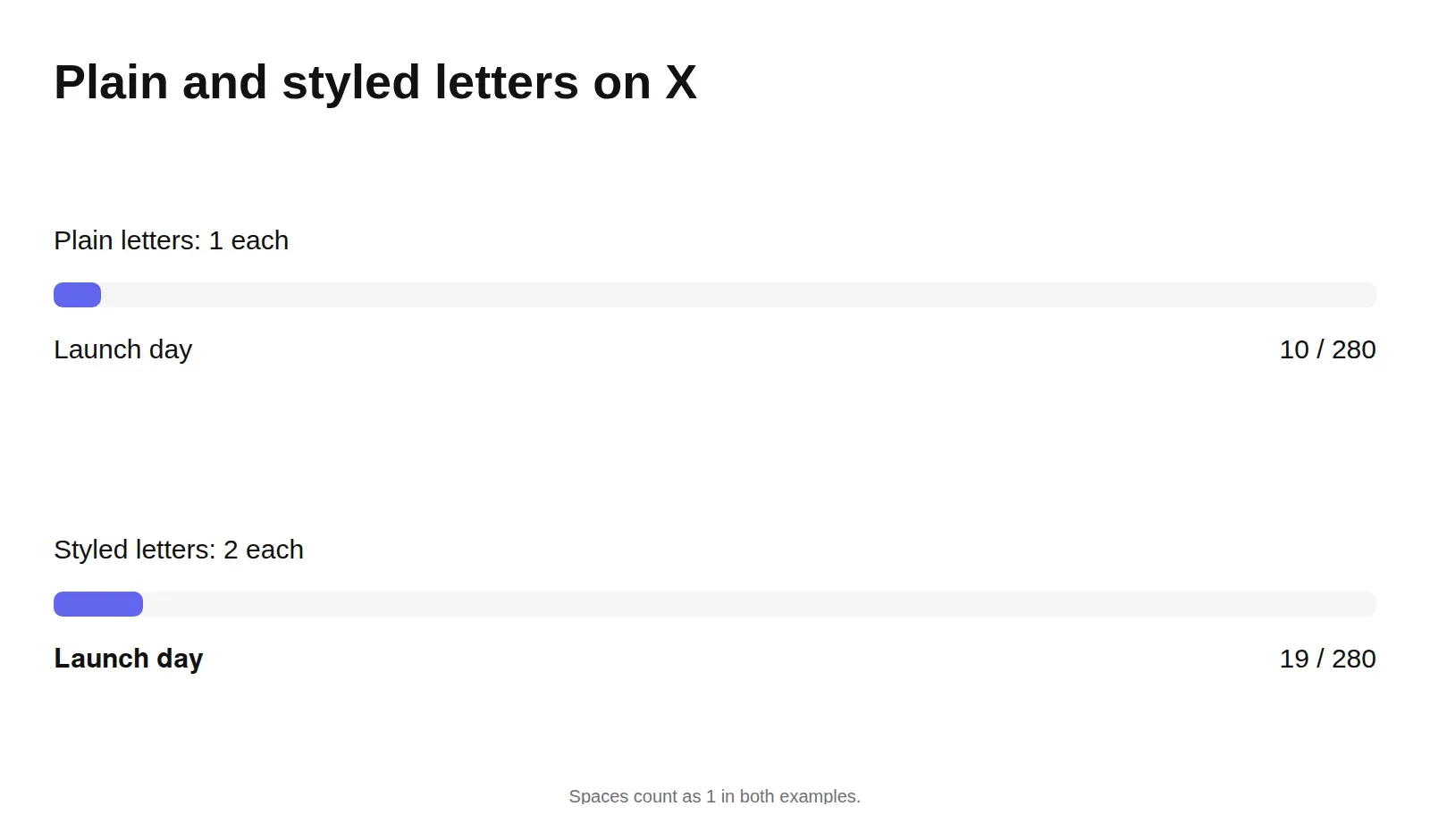
We ran the phrase Launch day (nine letters and a space) through X’s published weighting rules in each style:
| Style | What you paste | Code points | X counts it as |
|---|---|---|---|
| Plain | Launch day | 10 | 10 |
| Bold sans | 𝗟𝗮𝘂𝗻𝗰𝗵 𝗱𝗮𝘆 | 10 | 19 |
| Bold serif | 𝐋𝐚𝐮𝐧𝐜𝐡 𝐝𝐚𝐲 | 10 | 19 |
| Bold cursive | 𝓛𝓪𝓾𝓷𝓬𝓱 𝓭𝓪𝔂 | 10 | 19 |
| Bubble | Ⓛⓐⓤⓝⓒⓗ ⓓⓐⓨ | 10 | 19 |
| Vaporwave (wide space included) | Launch day | 10 | 20 |
| Small caps | ʟᴀᴜɴᴄʜ ᴅᴀʏ | 10 | 15 |
| Strikethrough | L̶a̶u̶n̶c̶h̶ d̶a̶y̶ | 19 | 19 |
Three things are worth noticing:
- Every letter-replacing style doubles the letters but not the space. 9 letters × 2 + 1 space = 19.
- Small caps is cheaper. ʟ, ɴ, ʜ and ʏ sit in the IPA Extensions block (U+0250–02AF), which is inside X’s weight-1 range. ᴀ, ᴜ, ᴄ and ᴅ come from Phonetic Extensions at U+1D00, which isn’t. So small caps lands between plain and bold.
- Strikethrough costs the same as bold, for a different reason. The letters stay plain (weight 1), but each gets a combining stroke U+0336, which is also in the weight-1 range. Two code points per letter at weight 1 each.
What that means for a whole post
Take a 51-character post: Launch day: the new app is live. Download it today.
| Version | X weight | Room left of 280 |
|---|---|---|
| All plain | 51 | 229 |
| Only “Launch day:” in bold sans | 60 | 220 |
| Everything in bold sans | 90 | 190 |
Bolding the hook costs nine characters. Bolding the whole post costs 39 and makes it harder to read. That’s why the generator above shows an X count on every style under Compatibility & details.
We computed these figures from X’s published configuration, which is the reference X’s own apps are built on. If X changes its counting, the numbers will change with it.
Numbers, emoji and threads
The same rule catches people out in places they don’t expect:
- Thread numbering.
1/costs 2. A bold𝟭/costs 3, because the bold digit is a math symbol. Across a ten-post thread it hardly matters, but in a post that is already tight, plain numbers are free space. - Emoji. Every emoji counts as 2, including multi-part ones like family or flag emoji that contain several code points. A row of five emoji is 10 characters.
- Curly quotes and dashes. ’ “ – — fall in X’s weight-1 punctuation ranges, so typographic punctuation costs no more than straight quotes.
- Bullets. • (U+2022) is just outside those ranges and counts as 2. A hyphen costs 1.
If a post is a character or two over, swap styled digits, bullets or one emoji for plain equivalents before cutting words.
Where you can use styled text on X
- Posts and replies. The best use is a short bold or italic hook at the start, or one emphasised phrase. Keep hashtags, @mentions and links plain: a styled @mention won’t link to anyone, and a styled hashtag is at best a different tag from the plain one people follow.
- Display name. Accepts styled letters and emoji, up to 50 characters according to X’s Help Center. A styled name doesn’t affect your @handle, so people can still find and mention you.
- Bio. Up to 160 characters. A bold label line plus a plain description works well, the same pattern as on Instagram.
- @handle. Letters, numbers and underscores only, 15 characters max. No styling possible.
How to post with bold text
- Write your post here first, or just the words you want to emphasise.
- Copy bold sans for a look that sits close to X’s own sans-serif interface, or bold serif for a more traditional weight.
- In the X composer, paste the styled words and type the rest normally.
- Watch the circular counter in the composer, which reflects X’s weighted count rather than a simple letter count.
- Before posting, read the post once out loud as a screen reader might, and make sure the plain words carry the meaning by themselves.
Styles that suit X
| Style | Example | Use it for |
|---|---|---|
| Bold sans | 𝗟𝗮𝘂𝗻𝗰𝗵 𝗱𝗮𝘆 | Hooks, headings inside threads, key numbers (𝟱𝟬% 𝗼𝗳𝗳) |
| Italic sans | 𝘓𝘢𝘶𝘯𝘤𝘩 𝘥𝘢𝘺 | Titles of books, films and papers; quoting a phrase |
| Bold italic sans | 𝙇𝙖𝙪𝙣𝙘𝙝 𝙙𝙖𝙮 | Strong emphasis on one or two words |
| Typewriter | 𝙻𝚊𝚞𝚗𝚌𝚑 𝚍𝚊𝚢 | Code names, commands, technical terms |
| Strikethrough | L̶a̶u̶n̶c̶h̶ d̶a̶y̶ | Jokes and corrections, such as “meeting at n̶o̶o̶n̶ 3pm” |
Gothic, bubble and glitch styles are fun in a display name but heavy going in a post. For more choice, the bold text generator, italic text generator and strikethrough generator each show their full sets.
The accessibility problem, demonstrated on X
The best-known demonstration of fancy text and screen readers happened on Twitter. In January 2019, developer Kent C. Dodds posted a video of VoiceOver reading a tweet in which half the words were written in styled letters, to show what such posts sound like to blind users. In a follow-up he pointed out that the screen reader was doing its job correctly: “those are actual mathematical characters”. The UK charity Scope gives an example of the result: a styled “t” can be announced as “mathematical sans-serif script t”, or skipped entirely.
On X that matters more than elsewhere, because posts are the content, not decoration. Practical rules:
- Style a few words, never the full post.
- Never style information people need: dates, prices, instructions, names of people or products.
- Prefer images with alt text for heavily designed text.
Our fancy text accessibility guide explains what different screen readers do, and the character limits guide compares how X’s weighting differs from the way other platforms count.
Style only a few words, because Twitter fonts use up the character count twice as fast and can be hard for screen readers.
Frequently asked questions
Basics
How do you bold text on Twitter?
What is the best Twitter font for a post?
Where it works
Can I use fancy fonts in my X username?
Do X Premium users get a different character limit?
How long can an X display name and bio be with fancy fonts?
Can I use styled @mentions and hashtags on X?
How it works
Why does my styled tweet say it is too long?
Which Twitter font counts as fewer characters?
How many styled letters fit in an X post?
Do emoji and bullets count extra on X?
Do styled numbers in a thread cost more characters?
Tips & limits
Does bold Unicode text hurt engagement on X?
Should I use bold Unicode for important details on X?
How can I fit more into an X post that uses styled text?
Related generators & guides
- Bold Text GeneratorThis bold text generator turns your words into 𝗯𝗼𝗹𝗱 Unicode letters for posts, captions and bios that have no bold button. Type your text, tap Copy and paste it into LinkedIn, X, Instagram or Facebook.
- Italic Text GeneratorThis italic text generator turns your words into slanted Unicode letters, such as 𝘪𝘵𝘢𝘭𝘪𝘤, for captions and bios with no italic button. Type your text, tap Copy and paste it into Instagram, LinkedIn, X or TikTok.
- Strikethrough Text GeneratorThis strikethrough text generator crosses out, underlines or slashes your words, such as S̶o̶l̶d̶ o̶u̶t̶, where there is no formatting button. Type your text, tap Copy and paste it into a bio, caption or comment.
- Character Limits for Bios, Names and Posts, and How Fancy Text CountsThe Instagram bio character limit is 150 characters; X allows 280 weighted characters per post, TikTok 80 in a bio and Discord 190 in About Me. Styled letters can count double, so a five-letter word can cost 5, 7, 10 or 20.
- Fancy Text and Screen Readers: What Happens and What to DoAre fancy fonts accessible? Mostly not: styled Unicode letters are separate characters, so screen readers may read long character names or skip them. Wide text and native formatting fare best; upside-down, glitch and look-alike styles fare worst.
- Instagram FontsThis Instagram fonts generator turns your name or bio into bold, cursive and small caps letters. Type, tap Copy and paste it into your Name, bio or captions; the table shows which fields accept it.