How to Type in Cursive on Any Device or App
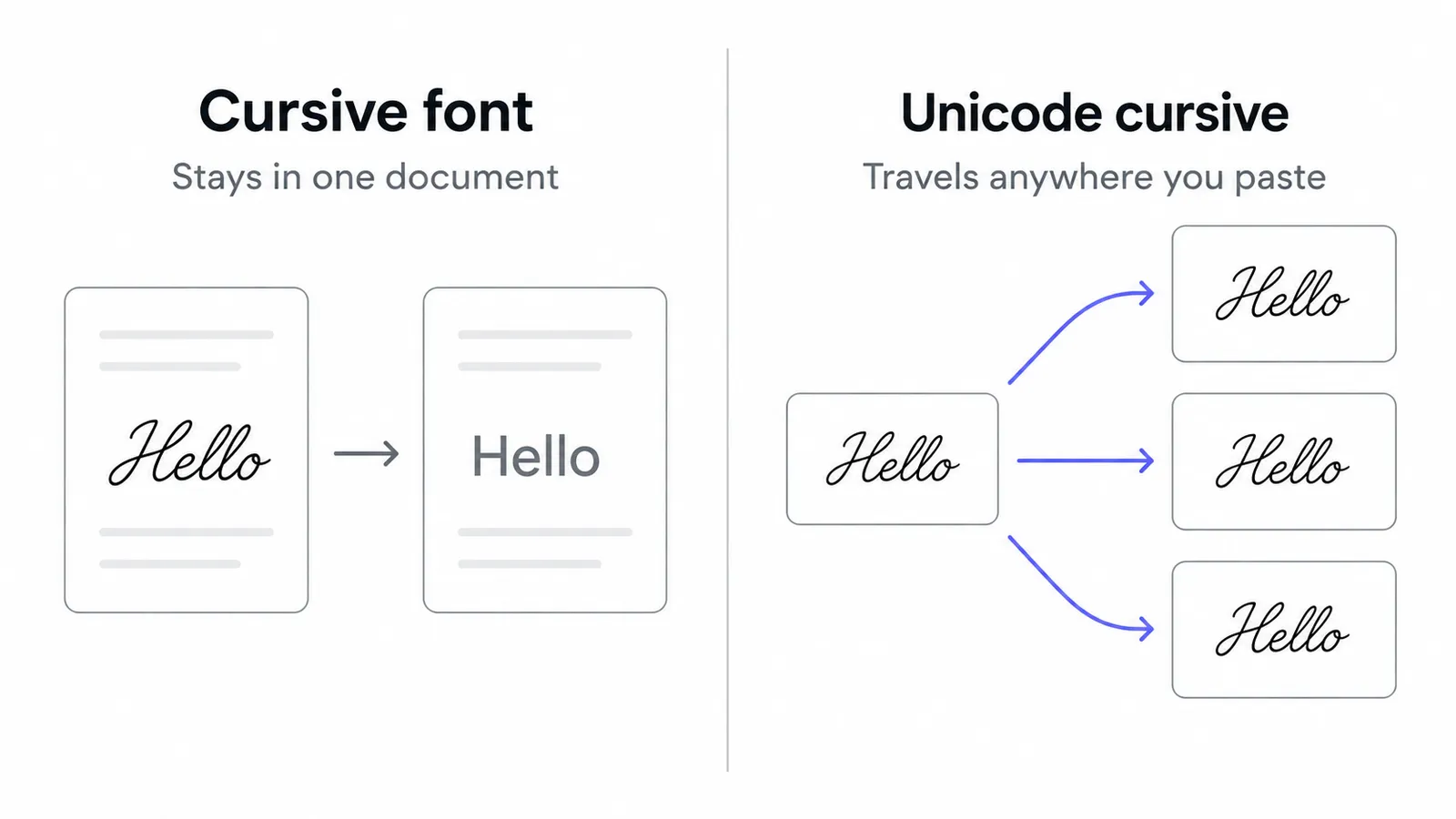
How to type in cursive depends on one choice: a cursive font, which only exists inside one document, or Unicode cursive characters, which stay cursive wherever you paste them. Use a font in Word and Docs, and Unicode on iPhone, Android and social apps.
By Maya Chen, lettering designer and type educator · Checked by Jordan Hale · · Published · How we review content
Key facts
- A cursive font is formatting stored in one document; Unicode cursive is different characters that stay cursive when pasted into any app.
- Unicode contains only two cursive alphabets, script and bold script, and neither has cursive digits.
- iOS has no built-in cursive keyboard, and Gboard has no cursive mode on Android.
- Google Docs, Slides and Sheets use the Google Fonts library, so a font you add travels with the shared document.
- Instagram @usernames reject Unicode cursive; bios, display names, captions and comments accept it.
- Exporting a PDF keeps a cursive font exactly as designed when the recipient does not have it installed.
This page gives the quickest route first, then the exact menu steps for Word, Google Docs, Canva, iPhone, Android, Discord and Instagram, plus a privacy warning about keyboard apps.
How to type in cursive: pick your method in ten seconds
| Where you are typing | Use | Why |
|---|---|---|
| Instagram, TikTok, X, Discord names and bios, messages, comments | Unicode cursive (copy and paste) | These fields have no font menu; only characters travel |
| Word, Pages, Google Docs, Slides | A cursive font | Real fonts look better, cover every letter and digit, and print properly |
| Canva, posters, invitations | A cursive font, then export an image or PDF | Full design control; the export locks the look in |
| A phrase you type often on your phone | Unicode cursive saved in Text Replacement | Type a shortcut, get the cursive phrase |
| Learning to write cursive by hand | Handwriting practice | See the stroke guides for every letter in our cursive alphabet |
What is the difference between a cursive font and Unicode cursive?
A cursive font is formatting. Your text is still made of ordinary letters; the document just tells the computer to draw them using a script typeface such as Dancing Script. Copy that text into a WhatsApp message and it arrives as plain letters, because the formatting doesn’t come with it. It also depends on the reader having the same font.
Unicode cursive is different characters. 𝓗𝓮𝓵𝓵𝓸 is five characters from Unicode’s Mathematical Alphanumeric Symbols block, each of which is a cursive letter. Paste it anywhere that accepts text and it stays cursive, because the style is part of the characters. The trade-offs: you get only the two script alphabets Unicode contains, there are no cursive digits, screen readers handle it poorly, and fields like usernames reject it. Our explainer on how fancy text works goes deeper.
| Cursive font | Unicode cursive | |
|---|---|---|
| Survives copy and paste into another app | No | Yes |
| Works in social media bios and names | No | Yes (not in @usernames) |
| Choice of styles | Thousands of script fonts | Two: script 𝒮𝒸𝓇𝒾𝓅𝓉 and bold script 𝓢𝓬𝓻𝓲𝓹𝓽 |
| Numbers and punctuation | Styled | Stay plain |
| Screen readers | Read normally | Often read poorly |
| Prints well | Yes | Depends on the printer’s fonts |
How do I copy and paste Unicode cursive?
This works on every device, in every app that accepts text.
- Open the cursive text generator.
- Type your text. Every cursive style updates as you type.
- Tap the style you like to copy it. Bold cursive (𝓢𝓪𝓻𝓪𝓱) is easier to read on small screens; regular script (𝒮𝒶𝓇𝒶𝒽) looks finer and more formal.
- Paste it where you want it.
If some letters show as boxes for the people reading it, their device lacks a font for those characters. Cursive is one of the safest styles in this respect, but our guide to why fancy text shows boxes covers what to do.
How do I type in cursive in Microsoft Word?
Use a script font that is already installed
- Select the text.
- Open the font box on the Home tab and type the font name.
- On Windows, Segoe Script comes with the system. Depending on your Office version you may also have Lucida Handwriting, Brush Script MT, Edwardian Script ITC or Vivaldi. On a Mac, macOS includes Snell Roundhand, Apple Chancery, Savoye LET and Zapfino.
Use the script font for headings, names and short lines. Even legible scripts slow readers down over a full paragraph, and connected scripts look wrong in ALL CAPS, because the capitals were designed to start words, not to sit next to each other.
Install a new cursive font
Google Fonts offers free script fonts under open licences.
- Go to fonts.google.com, search for a font such as Dancing Script or Great Vibes, and download it.
- Unzip the download.
- Windows: right-click the
.ttffile and choose Install (or Install for all users). Mac: double-click the file and click Install in Font Book. - Restart Word. The font now appears in the font list.
Keep the font when you share the file
Someone opening your document without that font will see a substitute. Two fixes:
- Embed the font: in Word for Windows, go to File → Options → Save and tick Embed fonts in the file. Word for Mac has the same setting in Preferences → Save. This makes the file larger.
- Export a PDF, which keeps the exact appearance and is the safer choice for invitations and printing.
How do I type in cursive in Google Docs, Slides and Sheets?
Google’s editors don’t use the fonts on your computer. They offer the Google Fonts library instead, and a font you add follows the document, so everyone you share it with sees it.
- Click the font name in the toolbar (it usually says Arial).
- Choose More fonts at the top of the list.
- Search for a script font, for example Dancing Script, Great Vibes, Pacifico, Sacramento or Pinyon Script. Filtering the list to Handwriting shows only script styles.
- Click the font so it is ticked, then OK. It now appears in your font menu in every Docs, Slides and Sheets file.
- Select your text and choose the font.
One catch: if you download the document as a Word file, the recipient needs the font installed on their computer, or Word will substitute another. Downloading as PDF avoids that.
How do I type in cursive in Canva?
- Select a text box.
- Click the font name in the top toolbar.
- Search for “script”, “cursive” or a specific font name. Canva’s library includes many free script fonts; some are marked as Pro.
- To use a font Canva doesn’t have, Canva Pro lets you upload your own in the Brand Kit, provided its licence allows it.
- Download your design as PNG or PDF. The cursive is now part of the image, so it looks the same everywhere.
If you only need a styled word or name as an image, the Lettering Image Maker does the same job in one step and exports a PNG.
How do I type in cursive on iPhone and iPad?
iOS has no cursive keyboard and no setting that changes the font of text you type into other apps. Your options:
Copy and paste from the generator
Use the generator as above. This is the quickest route.
Text Replacement for a cursive shortcut
Text Replacement turns a short code into a cursive phrase anywhere you type:
- Copy your cursive text from the generator.
- Open Settings → General → Keyboard → Text Replacement and tap +.
- Paste the cursive text into Phrase.
- Type a plain shortcut that you won’t type by accident, such as
zzname, into Shortcut, and save. - Now typing
zznamein any app offers your cursive phrase above the keyboard.
This is ideal for a cursive signature line or a name you use in bios.
Fonts in Pages and Keynote
Apple’s own apps include script fonts such as Snell Roundhand, and iOS lets you install extra fonts from font apps in the App Store, which then appear under Settings → General → Fonts. These are real fonts, so they only work inside apps that offer a font menu, not in Messages or Instagram.
How do I type in cursive on Android?
Gboard has no cursive mode, and neither do most phone makers’ built-in keyboards. Copying from the generator is the simplest route, and a long-press in most text fields gives you Paste.
Some phones, including Samsung models, let you change the system font style in display settings. That only changes how text looks on your screen. The people you message still see their own font, so it isn’t a way to send cursive.
Are cursive keyboard apps safe to use?
App stores are full of “fonts keyboard” apps that let you type straight into styled letters. They work by doing the same Unicode substitution as a generator. The convenience comes with a cost worth thinking about:
- On Android, enabling any third-party keyboard triggers a system warning that the input method may be able to collect all the text you type, including passwords and credit card numbers. That warning is accurate: a keyboard sees every keystroke.
- On iPhone, many such keyboards ask you to turn on Allow Full Access, which lets them send data off the device.
If you install one, choose a well-known developer, read its privacy policy, don’t grant full access unless a feature truly needs it, and switch back to your normal keyboard for passwords, banking and private messages. For occasional use, copying and pasting from a website that styles text inside your browser avoids the issue entirely.
How do I type in cursive on Discord, Instagram and WhatsApp?
Discord: there is no cursive markdown. *text* or _text_ gives you italics, which slant the letters without joining them. For true script, paste Unicode cursive into your display name, server nickname, About Me or messages. Your username only accepts lowercase letters, numbers, underscores and periods. The Discord fonts page has the full markdown cheat sheet.
Instagram: paste Unicode cursive into your name, bio, captions or comments. The @username rejects it. Instagram Stories and Reels have their own text styles, but those are drawn into the image or video and can’t be copied as text. See the Instagram fonts page for field-by-field rules.
WhatsApp: _text_ gives italics in messages, and Unicode cursive works in messages, your status and your About text.
Wherever you use it, keep cursive for short, decorative text such as a name or a heading. Long cursive sentences are harder for everyone to read and are especially difficult for people using screen readers; the accessibility guide explains why.
What if I meant cursive handwriting?
“Typing in cursive” sometimes means wanting your writing to look like real joined-up handwriting. Unicode cursive letters don’t connect to each other the way handwritten cursive does. If you want to learn to write it by hand rather than learn how to type in cursive on a screen, our cursive letters A to Z pages show the strokes for every capital and lowercase letter, with printable practice sheets.
Frequently asked questions
Basics
Why don't Unicode cursive letters connect like handwriting?
Where it works
How to type in cursive on iPhone, and is there a cursive keyboard?
How do I type in cursive on Android?
Which cursive fonts are already installed on Windows and Mac?
How it works
How to type in cursive in Google Docs?
Why did my cursive font disappear when I sent the document?
How to type in cursive on Discord?
Tips & limits
What is the best cursive font in Google Docs?
Can I use a cursive font in my Instagram bio?
Is it safe to use a cursive keyboard app?
Related
- Cursive Text GeneratorThis cursive text generator turns your words into script-style Unicode letters for names, bios and captions. Type your text, tap Copy and paste it into Instagram, TikTok, Discord or a message.
- Cursive Alphabet: Letters A to ZHow to write every capital and lowercase letter in cursive, with printable practice sheets.
- Instagram FontsThis Instagram fonts generator turns your name or bio into bold, cursive and small caps letters. Type, tap Copy and paste it into your Name, bio or captions; the table shows which fields accept it.
- Discord FontsThese Discord fonts turn your name or message into styled Unicode letters like 𝐍𝐨𝐯𝐚. Tap Copy and paste it into your display name, server nickname or About Me; the cheat sheet covers markdown for chat.
- How Fancy Text Works (and Why It Isn't Really a Font)How do fancy fonts work? They are not fonts: copy-paste styles are separate Unicode characters, mostly made for mathematics, phonetics and East Asian typesetting. The style travels with the text, but missing letters and fallback fonts change the look.
- What Is Lettering? How It Differs From Calligraphy and TypographyWhat is lettering? It is drawing letters for one specific piece, unlike calligraphy, which writes letters in strokes, and typography, which arranges ready-made type. Here is what each term means, the tools, the history, and how to start drawing letters.